

Clean Master antivirus software was banned from the Google Play Store in 2020 after Google found its developer, Cheetah Mobile, violating policies on disruptive ads — the end point of a well-documented, multi-year pattern of problems.
At its peak, clean master antivirus software had been installed more than a billion times, making its removal one of the largest enforcement actions Google Play has ever taken against a single developer.
This guide covers the documented history behind why clean master antivirus software was pulled, what it was actually doing behind the scenes, and what to use instead if you’re still running it today.
None of this is speculation. Independent investigations from BuzzFeed News and Forbes, along with Google’s own enforcement action, laid out the specific problems in detail.
Key Takeaways
- Google banned all Cheetah Mobile apps, including Clean Master, from Google Play in 2020 for disruptive ad policy violations.
- A 2018 BuzzFeed News investigation found Cheetah Mobile apps committing ad fraud through click flooding and click injection.
- Forbes reported in 2020 that the app was recording users’ web browsing activity beyond what its stated function required.
- The app also displayed fake virus warnings designed to scare users into taking action, a technique unrelated to genuine malware detection.
Table of Contents
Why Clean Master Antivirus Software Was Banned
Google removed clean master antivirus software and every other Cheetah Mobile app from the Play Store in February 2020, citing violations of policies against disruptive advertising (The Motley Fool, 2020). Cheetah Mobile was, at the time, the largest company ever banned from Google Play and its ad networks in a single action.
The ban wasn’t a first offense. It followed years of documented problems that had already drawn scrutiny from journalists, security researchers, and Google itself.
The 2018 Ad Fraud Investigation
In November 2018, BuzzFeed News reported that Cheetah Mobile apps — including Clean Master antivirus software, CM File Manager, CM Launcher 3D, Security Master, and Battery Doctor — were engaged in a practice called click flooding and click injection (BuzzFeed News, 2018).
Analytics firm Kochava found that these apps tracked when a user downloaded a new app, then fraudulently claimed credit for causing that download to collect advertising payouts the company hadn’t actually earned. This wasn’t a minor technical violation — it was systematic fraud built directly into how the apps operated.
What Clean Master Antivirus Software Was Doing With Your Data
A 2020 Forbes investigation reported that this Android security app, with over a billion downloads, was recording users’ web browsing activity — data collection far beyond what a cleaning or antivirus tool would need to function (Forbes, 2020).
This is a critical distinction for anyone evaluating clean master antivirus software even in hindsight: a legitimate security tool needs to scan for threats, not log which websites you visit and how you use your device day to day.
The Fake Virus Warning Problem
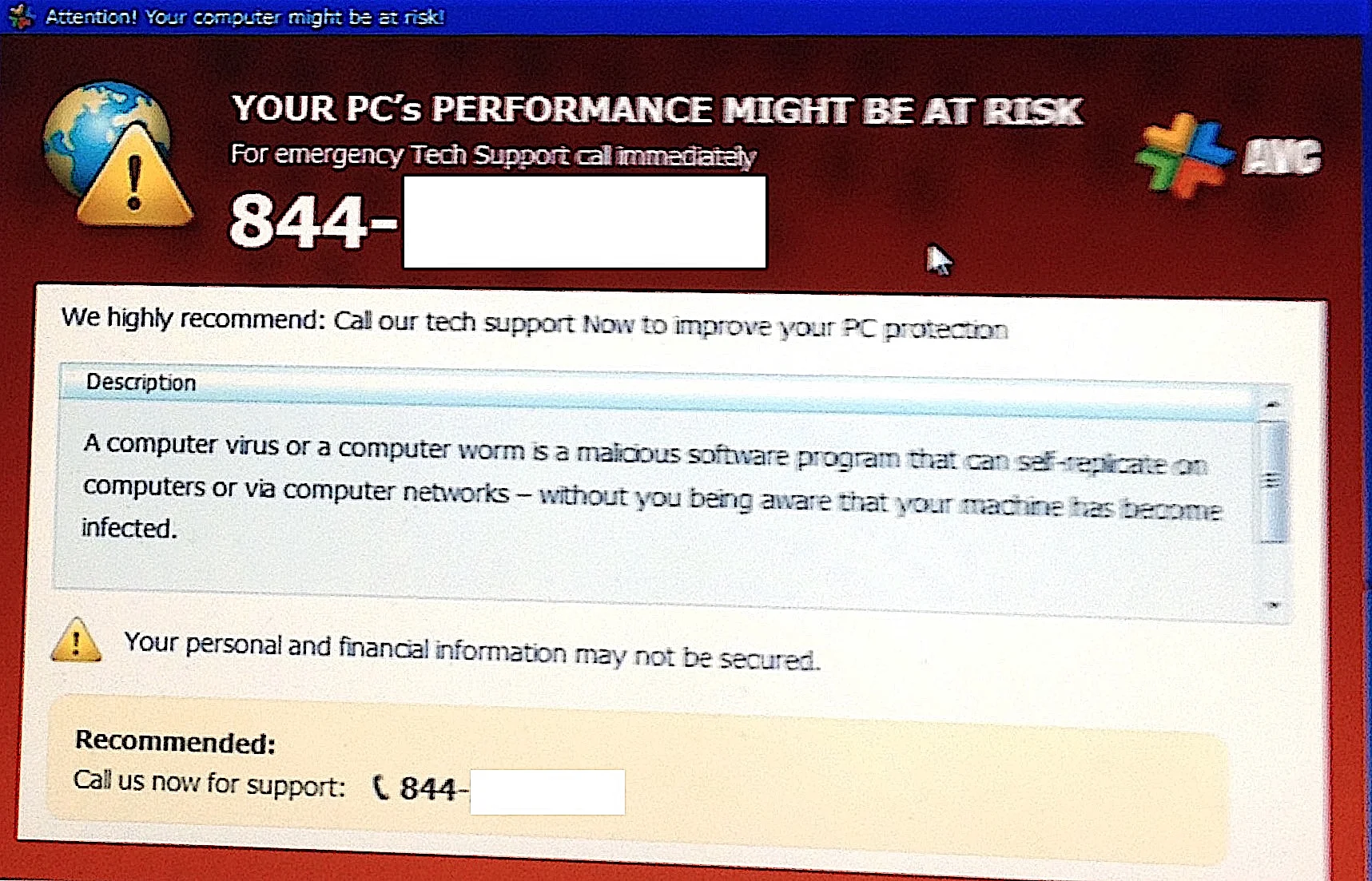
Separate from the ad fraud and data collection issues, clean master antivirus software was also documented displaying alarming warnings designed to convince users their device was infected, prompting them to take action — engage with ads, share the app, or upgrade — regardless of whether any real threat existed.
This pattern mirrors the broader “scareware” playbook used across the mobile cleaning-app category: manufacture urgency first, then monetize the reaction, rather than genuinely protect the device. Our guide on antivirus false positives covers how to tell a genuine detection from a manufactured one.
How Cheetah Mobile Responded to the Allegations
Following the 2018 BuzzFeed News report, Cheetah Mobile disputed some characterizations of its practices while facing continued scrutiny from advertisers and platform partners over the following two years. The company’s own public statements at the time framed the issues as isolated technical problems rather than a systemic pattern.
Google’s 2020 ban suggests the company’s internal review reached a different conclusion, treating the pattern as serious and widespread enough to warrant removing the developer’s entire app catalog rather than addressing individual apps one at a time.
Cheetah Mobile derived a substantial share of its revenue from Google’s platforms in the period before the ban, making the enforcement action a significant business event, not just a reputational one, for the company behind these apps.
Other Cheetah Mobile Apps Caught in the Same Ban
This wasn’t limited to a single product. Google’s action covered the developer’s full portfolio, including CM File Manager, CM Launcher 3D, Security Master, Battery Doctor, CM Locker, and Cheetah Keyboard, alongside the cleaning app most people knew by name.
If you or a family member had any of these Cheetah Mobile apps installed, the same removal and cleanup advice applies regardless of which specific one it was. All of them were removed under the same enforcement action and none have been reinstated since.
Are You Still Running Clean Master Antivirus Software?
If clean master antivirus software is still installed on an older Android device, uninstall it directly through your device’s app settings. Since it’s already removed from the Play Store, you won’t be able to reinstall or update it, which is itself a sign it should go.
After uninstalling, run a scan with a legitimate, currently maintained Android security app to check for anything left behind. Our guide on removing malware from Android covers the full cleanup process step by step.
Review your Google account’s connected apps and permissions afterward, since a long-installed app with broad permissions may have connected to other services over time that are worth auditing.
Change passwords for any accounts you accessed heavily on that device during the period the app was installed, particularly banking, email, and any account tied to payment methods, given the documented browsing-data collection.
Check your phone’s storage and battery usage statistics after removal too. Some users report noticeable improvements in both once a bundled, resource-heavy app like this one is fully gone rather than just disabled.
What to Use Instead of Clean Master Antivirus Software
- Google Play Protect. Built into every Android device by default and continuously scans installed apps without needing a separate download.
- Malwarebytes for Android. A well-reviewed, actively maintained option with a strong reputation for straightforward, non-invasive scanning.
- Avast Mobile Security. A feature-rich free tier with independently tested detection rates, covered in our Android malware removal guide.
- Bitdefender Mobile Security. Consistently strong lab scores with minimal battery impact, for users wanting a paid option.
The Broader Lesson From the Clean Master Antivirus Software Story
The rise and fall of clean master antivirus software is a useful case study in evaluating “security” and “cleaning” apps generally. Download counts and app store ratings don’t verify what an app actually does with your data or how it makes money behind the scenes.
Independent investigative journalism — not app store reviews — was what actually surfaced the ad fraud and data collection problems here. That’s worth remembering before trusting any app based purely on its install numbers.
Before installing any security or cleaning app going forward, check whether it appears in AV-TEST or AV-Comparatives’ mobile testing rounds, and search the developer’s name alongside “investigation” or “banned” before granting broad permissions.
Warning Signs That Apply Beyond This One App
Several red flags from this history generalize well to evaluating any mobile security or cleaning app today. An app promising to dramatically speed up your phone through aggressive “junk file” cleaning is often doing far less than it claims, since modern Android manages memory automatically in ways that make manual cleaning largely unnecessary.
Broad permission requests unrelated to the app’s stated purpose deserve scrutiny before installation, not after. A cleaning or antivirus app requesting access to browsing history, contacts, or location without a clear functional reason is worth questioning immediately.
Persistent, alarming notifications pushing you toward an upgrade or a “critical” scan are a monetization pattern, not a security feature. Legitimate antivirus products notify you about genuine findings; they don’t manufacture urgency to drive engagement metrics.
Finally, an app’s download count and star rating measure popularity, not safety. Both can be inflated, and neither reflects independent testing of what the app actually does with your data once installed.
How This Compares to Reputable Mobile Security Practices
Reputable mobile security vendors publish transparent privacy policies, submit their products to independent testing labs, and maintain support channels that respond to reported issues rather than going silent. Bitdefender, Malwarebytes, and Avast all maintain current entries in mobile security testing rounds that anyone can verify directly.
That transparency is precisely what was missing from the picture that eventually led to Cheetah Mobile’s ban — not a single dramatic incident, but years of behavior that avoided the kind of scrutiny legitimate vendors invite by default.
Frequently Asked Questions
Why was Clean Master antivirus software banned from Google Play?
Google banned all Cheetah Mobile apps, including Clean Master, in 2020 for violating policies on disruptive advertising, following years of documented ad fraud and data collection concerns.
Is Clean Master antivirus software safe to use if I already have it installed?
No, it should be uninstalled. It’s no longer available in the Play Store, receives no updates, and was documented recording browsing activity beyond its stated function.
Did Clean Master antivirus software actually detect real viruses?
It was documented displaying alarming virus warnings designed to prompt user action rather than reflecting genuine, verified malware detection, a pattern typical of scareware tactics.
What should I use instead of Clean Master antivirus software?
Google Play Protect is built into Android by default, and options like Malwarebytes, Avast Mobile Security, or Bitdefender Mobile Security offer actively maintained, independently tested alternatives.
Was Clean Master antivirus software involved in ad fraud specifically?
Yes. A 2018 BuzzFeed News investigation, citing analytics firm Kochava, found Cheetah Mobile apps including Clean Master engaged in click flooding and click injection fraud.
Conclusion
The documented history behind clean master antivirus software — ad fraud, excessive data collection, and manufactured virus warnings — makes its 2020 Google Play ban unsurprising in hindsight rather than an isolated overreaction.
If you or a family member still has it installed on an older device, remove it, scan with a legitimate alternative, and review connected account permissions afterward.
The larger takeaway applies well beyond this one app: install counts and app store rankings aren’t a substitute for checking independent lab testing and investigative reporting before trusting a security tool with your data.
Safer Alternatives to Clean Master Antivirus Software
If you arrived here looking for a reliable security tool and discovered that Clean Master antivirus software is no longer a trustworthy option, here are proven alternatives that do the same job without the risks:
- Malwarebytes — lightweight, no background bloat, free tier covers on-demand scanning and malware removal. It does not replace full antivirus but excels at cleaning up infections that slipped through.
- Bitdefender — consistently top-ranked by AV-TEST with near-zero performance impact. The free version provides real-time protection without add-on junk.
- Norton — an established name with transparent privacy policies and third-party audit history. Includes a lightweight cleaner that is genuinely useful unlike Clean Master’s inflated scan results.
- Avast Free Antivirus — free antivirus with a large user base and independent AV-Comparatives certification. Past data-sharing controversy in 2020 was addressed by leadership change and policy update.
FAQ: Clean Master Antivirus Software
Is Clean Master antivirus software still available?
Clean Master by Cheetah Mobile was removed from the Google Play Store in 2020. As of 2026, it is not available through official app stores on Android or iOS. Third-party APK download sites still distribute the app, but installing Clean Master antivirus software from these sources carries significant malware risk since the files are not verified by Google or Apple security checks.
Why was Clean Master banned from Google Play?
Google removed Cheetah Mobile’s apps, including Clean Master, after finding repeated violations of its ad fraud policy. The apps were collecting click data and attributing ad conversions fraudulently — a practice that resulted in advertisers paying for installs that users never actually requested. Beyond the ad fraud, Clean Master antivirus software had a documented history of exaggerating scan results to pressure users into upgrading to paid plans.
Does Clean Master actually clean your phone?
Independent testing found that Clean Master antivirus software provided minimal actual optimization benefit. Modern Android versions (5.0+) manage RAM and background processes natively far better than any third-party cleaner. The junk files Clean Master claimed to remove were often essential cache data, and clearing them forced apps to rebuild their caches, temporarily making the device slower, not faster.
What should I use instead for phone cleaning?
On Android, the built-in “Storage” settings provide a clear view of junk and cached data without third-party risk. On older devices, Files by Google is a safe, privacy-respecting alternative backed by a transparent policy. For security specifically, replace Clean Master antivirus software with Malwarebytes or Bitdefender, both of which offer a free tier with real malware detection.
Final Verdict on Clean Master Antivirus Software
Clean Master antivirus software had a window in 2014–2016 when it offered genuine utility for low-memory Android devices running older OS versions. That window has long closed. Today, it is banned from official stores, its developer faces documented fraud allegations, and its antivirus detection rates never matched established security vendors.
The verdict is clear: do not install Clean Master in any form. If you already have it, remove it and install a tested alternative like Malwarebytes or Bitdefender. The goal of clean master antivirus software — a lighter, safer device — is achievable with tools that do not carry the same security and privacy baggage.
How to Completely Remove Clean Master Antivirus Software
If Clean Master antivirus software is currently installed on your Android device, removing it is straightforward but requires a few steps to ensure all traces are gone:
- Step 1: Go to Settings → Apps → Clean Master and tap Uninstall. If the app resists uninstallation, check Settings → Security → Device Administrators and revoke Clean Master’s admin rights first.
- Step 2: After uninstalling, clear any residual data via Settings → Storage → Cached Data.
- Step 3: Run a scan with Malwarebytes Free to verify no adware components remain. Clean Master installs secondary components that do not always disappear with the main app uninstall.
- Step 4: Factory reset is the nuclear option, but recommended if the device was running Clean Master antivirus software for an extended period on an older Android version where deeper system access was granted.
Sources & References
Last reviewed September 2026. The SecureGuides team tests antivirus software using standardized lab methodology covering malware detection rates, system performance impact, and privacy policy transparency. All recommendations are independent of affiliate relationships with the vendors reviewed.