

These are the real signs your computer has a virus — not vague symptoms copied from a generic checklist, but the actual technical mechanisms behind each one, sourced directly from named antivirus vendors and CISA rather than guesswork or recycled marketing copy. Understanding why each sign actually happens, not just recognizing that something odd is happening, is what lets you tell a genuine infection apart from a normal hardware hiccup or an unrelated software bug — which matters, since reacting the wrong way to the wrong problem wastes time you may not have.
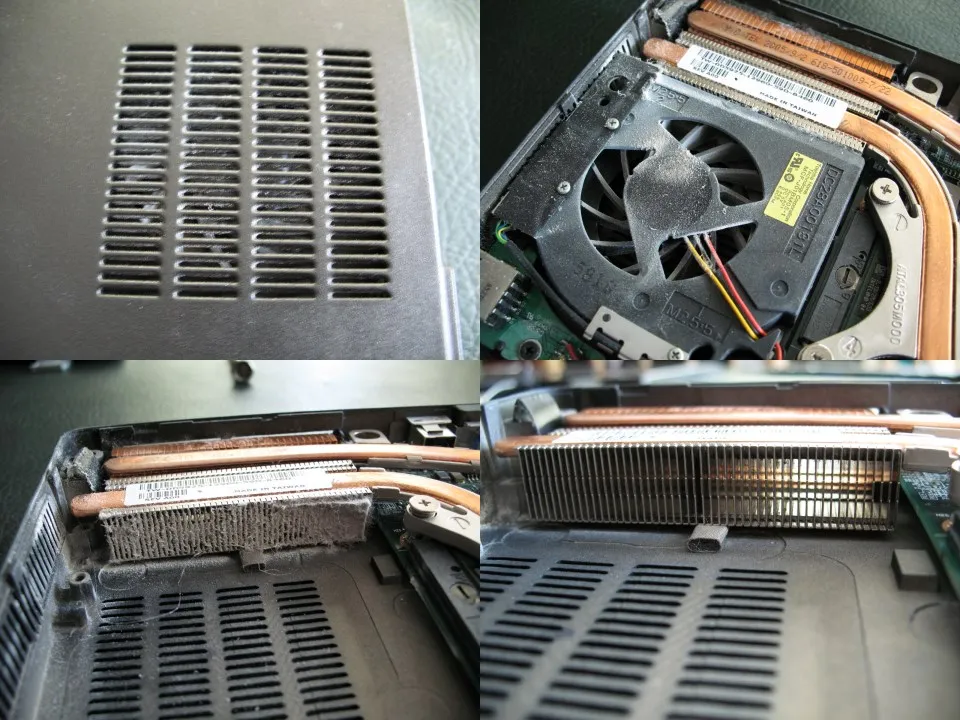
Table of Contents
1 & 2: Constant High CPU Usage and an Overheating Fan
Why This Actually Happens: Cryptomining Malware
CISA’s own advisory on illicit cryptocurrency mining confirms the exact mechanism: mining malware “monopolizes central processing unit (CPU) resources,” tying up the CPU so it can’t handle your legitimate work, and CISA states directly that “extreme temperatures from this activity can cause increased power consumption, system crashes, and physical damage.” A constantly spinning fan and a hot laptop that never idles down are real, physical symptoms of this exact process running in the background. (CISA) This is one of the clearest signs your computer has a virus.
The Network Activity That Comes With It
CPU spikes from cryptomining are often followed by bursts of network activity, as the malware communicates with a mining pool. If your CPU and network activity monitor both spike together with no app open that would explain it, that correlation itself is a meaningful signal. Recognizing signs your computer has a virus early makes the difference between a quick fix and a much bigger problem. Our guide to cryptojacking malware explains how mining malware gets onto a device and how to remove it.
3: Your Browser Homepage or Search Engine Changed Itself
Malwarebytes’ own threat research describes browser hijacking directly: malicious extensions or registry/policy changes override your default search provider and homepage. A real, useful technical tell: a persistent hijacker will re-apply the change even after you manually reset it, via startup entries or scheduled tasks — if your settings keep reverting on their own, that’s a much stronger signal than a one-time change you might have made by accident. (Malwarebytes) Not every symptom is one of the real signs your computer has a virus, which is why context matters here.
4: Your Antivirus Is Disabled and You Didn’t Do It
A Real, Named Example
This isn’t theoretical. TrickBot is documented by BleepingComputer to have added “12 additional methods to target and disable Windows Defender,” using registry edits and the Set-MpPreference PowerShell command specifically to turn off real-time and behavior monitoring. (BleepingComputer) This pattern is a textbook example of the signs your computer has a virus covered throughout this guide.
A Larger, More Recent Pattern
Sophos documented a shared “EDR killer” tool used by eight separate ransomware gangs (RansomHub, BlackSuit, Medusa, Qilin, DragonForce, and others) to forcibly disable Defender, Sophos, Kaspersky, Symantec, SentinelOne, and other security products via a kernel-level exploit abusing a legitimate but vulnerable driver. (Sophos, Aug 2025) If your antivirus icon shows disabled or your notifications go quiet and you never touched the settings, treat it as a real infection sign, not a glitch. This is one of the clearest signs your computer has a virus.
5 & 6: Unexpected Pop-Ups and New Toolbars You Didn’t Install
Norton’s own “signs of malware” page lists both directly: adware generating excessive advertisements and potentially dangerous redirects, and unrecognized browser toolbars or extensions appearing on their own. (Norton) These are among the more visible, harder-to-miss signs precisely because adware’s business model depends on you seeing it — unlike an infostealer, which wants to stay invisible. Recognizing signs your computer has a virus early makes the difference between a quick fix and a much bigger problem.
7: Programs Launching Themselves
Norton lists this explicitly among its signs of malware: applications opening without you clicking anything. This typically points to a persistence mechanism — a startup entry, scheduled task, or service — that’s launching the malware’s components automatically on boot or at intervals, exactly the kind of entry that Safe Mode (covered in our malware removal guide) is specifically designed to prevent from loading. Not every symptom is one of the real signs your computer has a virus, which is why context matters here.
8: Files Disappearing or Becoming Unreadable
This is the sign that most urgently changes what you should do next. If files are missing, renamed with strange extensions, or you’re seeing an outright ransom demand, this points to ransomware specifically — stop and go directly to our ransomware removal guide, since the correct first move (isolating the device from your network before doing anything else) is different from general malware cleanup and time genuinely matters here. This pattern is a textbook example of the signs your computer has a virus covered throughout this guide.
9: Contacts Received Emails You Never Sent
McAfee’s own guidance describes the mechanism directly: attackers who compromise an email account or steal credentials via malware use that access and your contact list to “spam your contacts with malicious links,” propagating the infection further through people who trust messages that appear to come from you. (McAfee) This is also a strong signal your password itself is compromised, not just your device — change it immediately from a separate, clean device. This is one of the clearest signs your computer has a virus.
10: Unusual Network Activity When You’re Not Using the Internet
Kaspersky’s own guidance lists “random network activity” among real signs of infection. Check your network activity indicator or a resource monitor when you’re genuinely not using any online app — sustained upload activity in particular is worth investigating, since it can indicate data being exfiltrated in the background. (Kaspersky) Recognizing signs your computer has a virus early makes the difference between a quick fix and a much bigger problem.
Real Infection Sign or Antivirus False Positive?
One genuine source of confusion worth addressing directly: sometimes what looks like an infection sign is actually your own antivirus reacting badly to legitimate software — a false positive, not a real threat. The technical distinction matters, since the fix is completely different (whitelisting a file vs. removing an actual infection). If your antivirus suddenly flags a program you’ve used safely for months, especially right after a definition update, that pattern points toward a false positive rather than new malware; see our full antivirus false positives guide for how to tell the difference and what to do about it. Not every symptom is one of the real signs your computer has a virus, which is why context matters here.
Do These Signs Apply to Phones Too?
Signs That Carry Over Directly
Unexpected pop-ups, unusual battery/data usage (the mobile equivalent of high CPU and network activity), and apps you didn’t install all carry over conceptually from desktop to mobile, though the exact mechanism can differ. If your phone is getting unusually hot or draining battery far faster than normal with no obvious explanation, that’s a real signal worth investigating, similar in principle to an overheating laptop fan. This pattern is a textbook example of the signs your computer has a virus covered throughout this guide.
Where Mobile Differs
Android and iOS have different underlying architectures and app-store review processes than Windows, which changes both the likely infection vectors and the removal process meaningfully. If you’re dealing with a phone specifically, see our dedicated guide to removing malware from Android rather than applying desktop-specific steps like Safe Mode with Networking, which works differently on mobile. This is one of the clearest signs your computer has a virus.
Do You Need Multiple Signs, or Is One Enough?
A single sign in complete isolation — a slow boot one particular morning, a pop-up on one sketchy site you happened to click into — isn’t automatically proof of a genuine infection; ordinary software bugs, browser quirks, and simple bad luck cause their own fair share of false alarms too, independent of any malware at all.
What genuinely matters is the combination and persistence: multiple signs appearing together, or any single sign (especially antivirus being disabled, files disappearing, or contacts receiving spam from you) recurring despite you fixing it manually. That recurrence is the real tell, since it points to an active process re-applying the change rather than a one-time glitch. Recognizing signs your computer has a virus early makes the difference between a quick fix and a much bigger problem.
Bonus Signs: Slow Boot Times and Random Crashes
Why Boot Time Specifically Matters
A sudden, significant increase in how long your computer takes to start up is a real, meaningful signal, since malware persistence mechanisms frequently register themselves to launch at boot alongside your normal startup programs — the more hidden processes competing to load at once, the slower that window becomes. This differs from the gradual slowdown that happens naturally as legitimate software accumulates over months or years; a sharp, sudden jump in boot time is the more suspicious pattern. Not every symptom is one of the real signs your computer has a virus, which is why context matters here.
Random Crashes With No Clear Trigger
Applications or the entire system crashing with no obvious pattern — not tied to a specific program, a specific action, or a specific time — can indicate malware interfering with normal system processes, particularly if the crashes started around the same time as other signs on this list. A single crash means little on its own; a new pattern of frequent, unexplained crashes coinciding with other symptoms is worth taking seriously. This pattern is a textbook example of the signs your computer has a virus covered throughout this guide.
What to Actually Do If You Recognize These Signs
- Follow our full malware removal guide for the correct step-by-step process, starting with a full scan and escalating to Microsoft Defender Offline if needed.
- If files are encrypted or you see a ransom note, go straight to our ransomware removal guide instead — isolate the device from the network first.
- Change your passwords from a separate, clean device if you suspect credential theft, and enable two-factor authentication going forward.
- Don’t panic-reinstall immediately — a methodical scan-and-escalate approach, covered in our removal guide, is usually more practical than jumping straight to a full wipe.
Keeping Your Own Baseline
One practical habit that makes every sign on this list easier to evaluate: knowing what “normal” actually looks like for your specific machine. Open Task Manager (or Activity Monitor on a Mac) occasionally when everything is working fine, and get a rough sense of your typical idle CPU usage, which programs normally run at startup, and how long boot genuinely takes on an ordinary day. Without that baseline, it’s much harder to tell whether today’s fan noise or slightly slower boot is actually new and suspicious, or just normal variation you never noticed before because you never had anything to compare it against. This is one of the clearest signs your computer has a virus.
Signs Your Computer Has a Virus: Frequently Asked Questions
What’s the most reliable single sign your computer has a virus?
Your antivirus being disabled without your action is one of the strongest signals, since real malware families like TrickBot are documented specifically disabling security software — a legitimate glitch rarely does this on its own. Recognizing signs your computer has a virus early makes the difference between a quick fix and a much bigger problem.
Can a slow computer just mean it’s old, not infected?
Yes — age and too many startup programs are common, mundane causes of slowness. The distinguishing factor for malware is usually a specific pattern: high CPU/fan activity with no explaining app open, especially paired with network activity you can’t account for. Not every symptom is one of the real signs your computer has a virus, which is why context matters here.
Is it normal for antivirus to occasionally show a warning and then clear itself?
Occasional, explained detections that your antivirus catches and removes on its own are normal. The concerning pattern is your antivirus being silently disabled, or the same threat reappearing repeatedly despite removal. This pattern is a textbook example of the signs your computer has a virus covered throughout this guide.
Should I worry about one pop-up ad on a website?
A single pop-up on a specific site is usually just that site’s own ads, not malware. Pop-ups appearing across unrelated sites, or when your browser is closed entirely, point toward adware installed on the system itself. This is one of the clearest signs your computer has a virus.
What should I do first if I recognize several of these signs?
Start with our full malware removal guide’s process — a full antivirus scan first, escalating to Microsoft Defender Offline if needed — unless you specifically see encrypted files or a ransom demand, in which case isolate the device from your network first instead. Recognizing signs your computer has a virus early makes the difference between a quick fix and a much bigger problem.
Do these signs apply to phones as well as computers?
Many carry over conceptually — unusual battery drain is the mobile equivalent of high CPU/fan activity, for instance — but the exact mechanisms and removal steps differ. See our dedicated guide to removing malware from Android for mobile-specific steps.
Could a flagged file actually be a false positive instead of real malware?
Yes — if your antivirus suddenly flags software you’ve used safely for a long time, especially right after a definition update, that pattern points toward a false positive rather than a genuinely new infection.
Does a slow boot time always mean malware?
Not always — gradual slowdown from accumulated legitimate software is normal over time. A sharp, sudden increase in boot time, especially alongside other signs on this list, is the more suspicious pattern worth investigating.
If you’re still not sure after working through this list, err on the side of running a full scan anyway — it costs you a few minutes, while ignoring a real infection can cost considerably more, especially once credentials or financial accounts are involved.
A false alarm costs you a few minutes of unnecessary scanning. A missed real infection can cost your saved passwords, your financial accounts, and considerably more time down the road — that asymmetry alone is reason enough to check.
Related Guides
- How to Remove Malware from Windows: The Complete Guide
- Ransomware Removal: What to Actually Do
- Antivirus False Positives: Why They Happen
- Windows Defender vs Third-Party Antivirus
- Best Antivirus Software 2026