

AI-written phishing emails jumped from 4% to 56% of all reported attacks in a single month, according to Hoxhunt’s 2026 threat data (Hoxhunt, 2026). Knowing how to spot a phishing email matters more now than at any point in the last decade.
The old advice — look for typos and bad grammar — barely helps anymore. AI-written scams read as cleanly as a real message from your bank.
This guide walks through what actually still works to spot a phishing email in 2026, using verified data instead of outdated checklists.
None of these techniques require technical expertise. They’re habits anyone can build in a few minutes of practice.
Key Takeaways
- AI-generated phishing surged from 4% to 56% of reported attacks in December 2025 alone (Hoxhunt, 2026).
- Phishing remains a top initial access vector in confirmed breaches, per Verizon’s 2026 Data Breach Investigations Report.
- Learning to spot a phishing email now depends more on checking the sender and links than spotting typos.
- CISA, NSA, FBI, and MS-ISAC jointly recommend verifying requests through a separate, known channel before acting.
Table of Contents
Why It’s Harder to Spot a Phishing Email in 2026
Generative AI removed the biggest historical tell. Grammar mistakes and awkward phrasing used to be the fastest way to spot a phishing email, but AI-written messages now read naturally in dozens of languages.
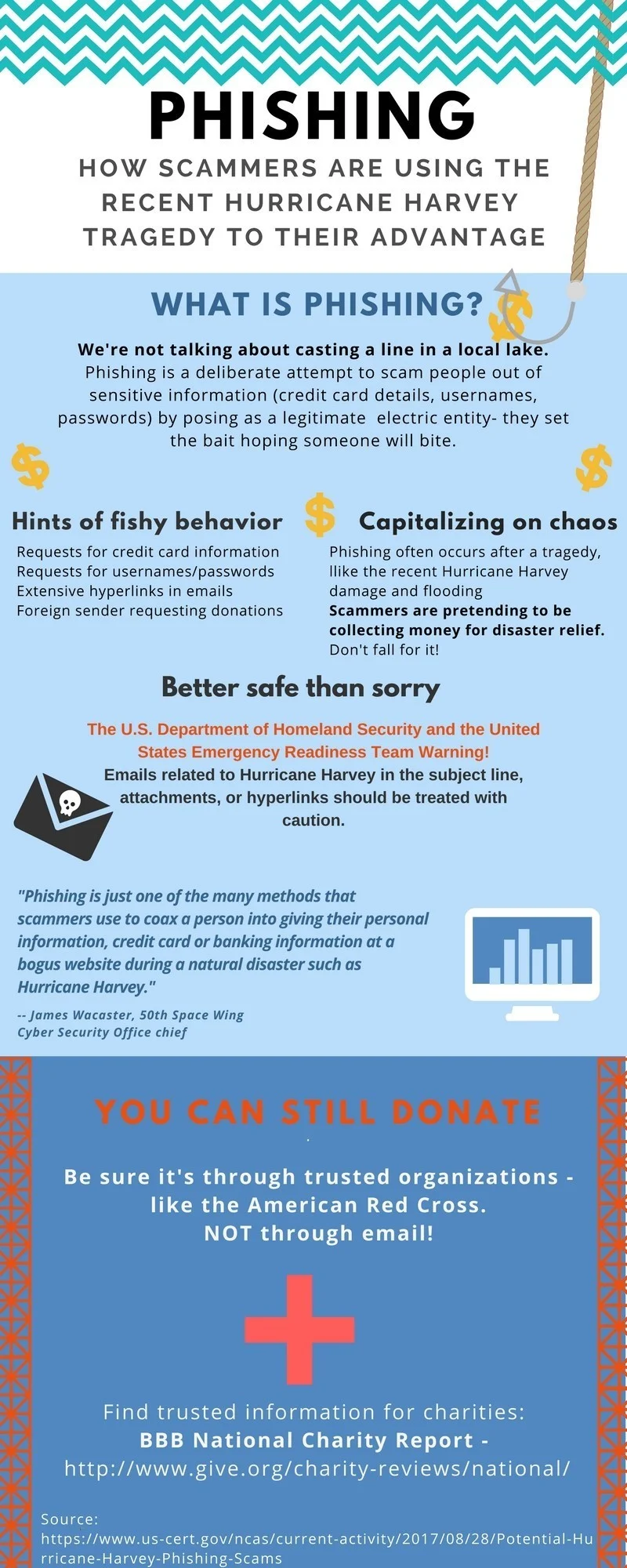
Hoxhunt’s data shows AI-assisted attacks stayed under 5% of monthly volume through most of 2025, then spiked to 56% in December before settling around 40% in January 2026. That’s not a gradual shift — it’s a sudden industry-wide adoption of AI tooling by attackers.
Verizon’s 2026 Data Breach Investigations Report confirms phishing remains one of the most common ways attackers gain initial access to networks, alongside stolen credentials (Verizon, 2026). The technique works because it targets people, not software.
The Signals That Still Work to Spot a Phishing Email
Even with AI-polished writing, certain signals remain reliable. Learning to spot a phishing email today means shifting attention from language quality to structural details attackers can’t easily fake.
1. Check the Actual Sender Address, Not the Display Name
Display names are trivial to fake. The real domain after the @ symbol is much harder to spoof convincingly, so always expand or hover over the sender name before trusting it.
2. Hover Before You Click Any Link
Hovering over a link reveals its true destination in most email clients. A mismatch between the visible text and the actual URL is one of the clearest ways to spot a phishing email, regardless of how well-written the message is.
3. Treat Urgency as a Red Flag, Not a Reason to Rush
CISA specifically warns that urgent or emotionally charged language is a hallmark of phishing, designed to short-circuit careful thinking. Phrases like “act now” or “your account will be suspended” deserve extra scrutiny, not less.
4. Verify Requests Through a Separate Channel
The joint CISA, NSA, FBI, and MS-ISAC phishing guidance recommends out-of-band verification as a core defense (CISA, 2025). If an email asks for money or credentials, contact the sender using a phone number or address you already have, not one provided in the message.
5. Look for Mismatched Branding and Formatting
AI can write clean prose, but logo resolution, color accuracy, and footer formatting are still often slightly off in a spoofed email compared to the real company’s template.
Anatomy of a Real Phishing Email
Picture a message claiming to be from your bank, warning that your account will be locked in 24 hours unless you “verify your identity.” The logo looks right. The tone is professional. There’s not a single typo.
This is exactly the kind of message that makes learning to spot a phishing email feel harder than it used to be. Walking through it piece by piece still reveals the fake.
The sender address, once expanded, reads something like “security-alert@bank-verify-secure.com” instead of your bank’s actual domain. That mismatch is the single strongest signal in the entire message.
The link labeled “Verify Now” points, when hovered, to a URL with your bank’s name buried inside a much longer, unfamiliar domain. Real institutions almost never route account verification through a domain like that.
The urgency — a 24-hour deadline — exists purely to stop you from doing exactly what you’re doing now: slowing down and checking the details before clicking anything.
Phishing Email vs. Spear Phishing vs. Whaling
Not every attempt to trick you looks the same, and knowing the difference helps you spot a phishing email aimed specifically at you versus a mass campaign.
| Type | Target | Typical Sign |
|---|---|---|
| Standard phishing | Mass audience, no personalization | Generic greeting, broad claim (“your account”) |
| Spear phishing | A specific person or role | Uses your real name, job title, or a real colleague’s name |
| Whaling | Executives or high-value targets | Impersonates a CEO or board member requesting urgent action |
Spear phishing and whaling are harder to catch because attackers research the target first, often using information scraped from LinkedIn or a company website. The core defense stays the same: verify through a separate channel before acting.
New Phishing Tricks Making It Harder in 2026
Scammers have adapted their delivery methods, not just their writing. One recent example the FTC flagged is a fake CAPTCHA prompt that instructs victims to press specific keyboard shortcuts, which secretly runs malicious commands instead of verifying you’re human (FTC consumer alert, 2026).
Calendar invite phishing is another growing trick. A fake meeting invite can carry a malicious link disguised as a normal calendar notification, bypassing some spam filters that focus only on traditional email bodies.
QR code phishing, sometimes called “quishing,” continues to grow too. Because a QR code hides its destination until scanned, it defeats the “hover before you click” habit that helps you spot a phishing email in a traditional message.
Business email compromise remains one of the costliest variations. Instead of a mass campaign, an attacker studies a real invoice or vendor relationship, then sends a near-perfect replica asking for payment details to be updated before the next transfer.
Voice-cloned follow-up calls are increasingly paired with phishing emails too. A fake urgent email is followed by a call using a cloned voice to add pressure, making it harder to pause and verify.
Mobile Phishing Deserves Extra Caution
Small screens make it genuinely harder to spot a phishing email. Sender addresses often truncate, and hovering over a link isn’t possible on a touchscreen the way it is on a desktop.
Verizon’s 2026 report notes that mobile-centric phishing sees notably higher successful click rates than the same attempts delivered by desktop email, partly because of this reduced visibility into sender and link details.
When reviewing email on a phone, tap and hold a link instead of tapping it directly — most mobile email apps will preview the destination URL without opening it. If your phone doesn’t support that, wait until you’re at a desktop to verify anything urgent.
What to Do If You Suspect a Phishing Email
Don’t click any link or download any attachment. Instead, verify independently, using a bookmarked website or a phone number you already trust.
Report it. The FTC accepts phishing reports at ReportFraud.ftc.gov, and forwarding the email to reportphishing@apwg.org helps researchers track new campaigns (FTC, 2026).
If you’re at work, notify your IT or security team immediately, even if you didn’t click anything. A single reported attempt can help block the same campaign from reaching your colleagues.
Delete the message once it’s reported. There’s no benefit to keeping a phishing email in your inbox once you’ve flagged it.
What to Do If You Already Clicked
Disconnect the device from the internet if you downloaded an attachment, then run a full antivirus scan before doing anything else.
Change your password immediately if you entered credentials on a fake page, and do it from a separate, clean device. Enable two-factor authentication if you haven’t already.
Watch your accounts closely over the following weeks. Some attackers wait before acting on stolen information, hoping you’ll assume the danger has passed.
If the phishing email impersonated your workplace, report it to IT even after the fact. They may need to reset shared credentials or check whether the same campaign reached other employees.
Consider a credit freeze if the phishing email specifically targeted financial or identity information. It’s a stronger, though more inconvenient, protection than monitoring alone.
Training Yourself to Spot a Phishing Email Faster
Many companies now run simulated phishing tests to help employees practice in a low-stakes setting. If yours offers one, take it seriously — repetition is what turns these checks into instinct.
At home, build the habit of pausing for ten seconds before clicking any unexpected link, regardless of how legitimate the sender looks. That pause is often enough to notice the details that reveal a fake.
Keep a mental shortlist of the organizations that would realistically email you about money or account access — your bank, your employer, maybe one or two subscription services. Any message claiming urgency from outside that short list deserves extra suspicion by default.
Teach the same habits to less tech-savvy family members explicitly, rather than assuming they’ll pick it up naturally. A ten-minute conversation about hovering over links and checking sender addresses can prevent a costly mistake months later.
Bookmark the real login pages for your bank and most-used accounts. Using a saved bookmark instead of a link from an email removes the single most common way people land on a fake page while trying to spot a phishing email too late.
Frequently Asked Questions
How do I spot a phishing email if it has no typos?
Check the sender’s actual domain, hover over links before clicking, and treat urgent language as a warning sign. AI-written phishing emails read cleanly, so grammar is no longer a reliable signal.
How common is AI-generated phishing in 2026?
Very common. AI-generated phishing attacks surged from 4% to 56% of reported attacks in December 2025 alone, settling around 40% in January 2026 (Hoxhunt, 2026).
What should I do if I can’t tell whether an email is phishing?
Don’t click any links. Contact the supposed sender directly using a phone number or website address you already trust, not anything provided in the email itself.
Where do I report a phishing email?
Forward it to reportphishing@apwg.org and report the attempt to the FTC at ReportFraud.ftc.gov. Both help researchers and regulators track active campaigns.
Can antivirus software help me spot a phishing email?
Yes, partially. Many antivirus suites include phishing-link scanning that blocks known malicious URLs, but new or highly targeted phishing emails can still slip through, so manual verification habits remain essential.
Is it still useful to check for typos when trying to spot a phishing email?
It helps less than it used to, but it’s not useless. Cheaper, mass-market phishing kits still produce sloppy messages, while well-funded AI-assisted campaigns increasingly don’t. Treat clean writing as no longer a sign of safety.
Why do phishing emails still work if people know about them?
Because they exploit urgency and trust faster than most people can think critically in the moment. Even security-aware employees click under enough time pressure, which is why verification habits matter more than awareness alone.
Conclusion
Learning to spot a phishing email in 2026 means retraining your instincts. Grammar and spelling no longer give the game away.
Checking the sender’s real address, hovering over links, and verifying urgent requests through a separate channel catch what AI-polished writing can’t hide. Build those three habits, and most phishing attempts lose their power immediately.
The threat will keep evolving, from calendar invites to fake CAPTCHA prompts. The underlying defense doesn’t change: slow down, verify independently, and never let urgency make the decision for you.
Practice these habits until they’re automatic, and you’ll be able to spot a phishing email in seconds, no matter how convincing the next generation of scams becomes.